If you are using the Free Plan, you do not need to cancel; your scanned file data will be removed after 30 days of inactivity.
It is easy to cancel your subscription in the app. You will continue to have full access until the end of your current billing period, and you won’t be charged again.
- To cancel your subscription, visit the Billing & Account Settings page. You can navigate to this page by clicking your user avatar and selecting Billing & Account Settings.
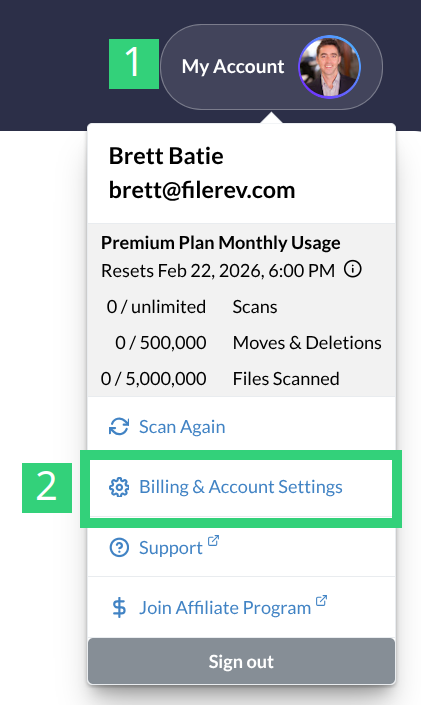
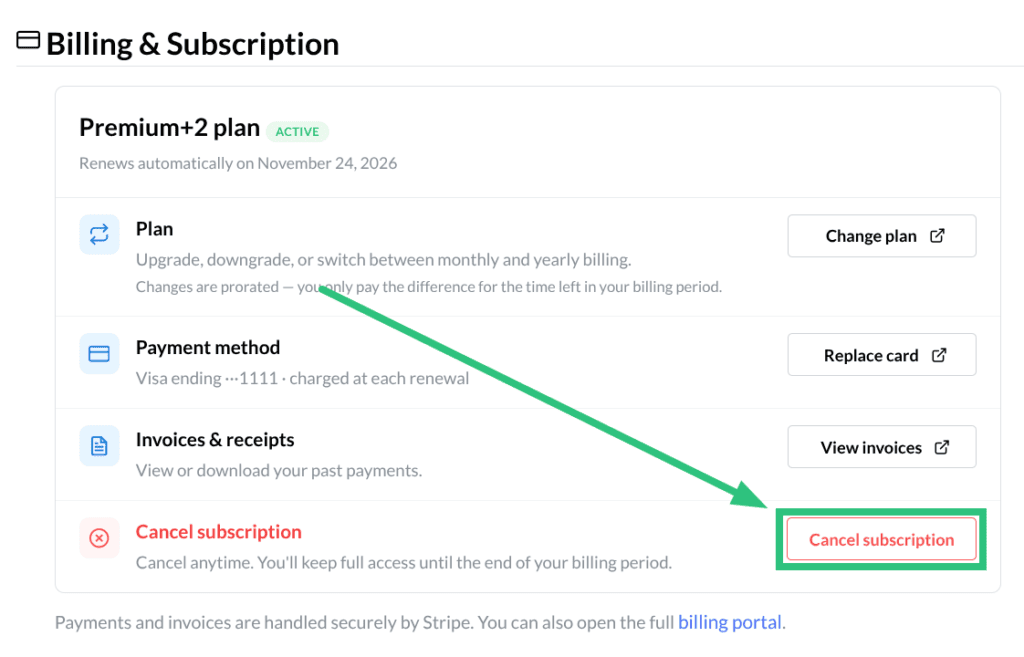
2. Then click the Cancel Subscription button.
3. Leave feedback (optional) and then click Proceed with Cancellation.
That’s it. The page confirms the date your access ends, and you can click Reactivate Subscription any time before then if you change your mind.
Can’t Login?
If you can no longer access your Google Drive account or cannot log in to Filerev. Please contact us and provide your name and the last 4 digits of your credit card on file so we can manually cancel your subscription.
Subscribed through the Apple App Store?
If you purchased your plan via in-app purchase in the Filerev iPhone or iPad app, it’s billed by Apple and can’t be canceled in Filerev. Instead, manage it at Apple’s subscription settings (or on your device: Settings → your name → Subscriptions). Filerev also shows an App Store button on the billing & account settings page that takes you to the App Store.